<strong>Everskies怎么改中文</strong>
<strong>Everskies攻略大全</strong>
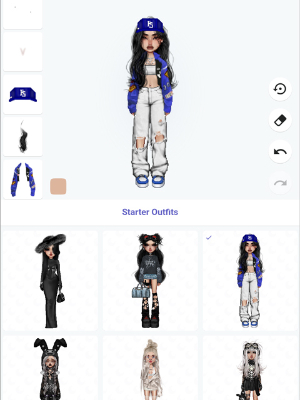
1、首先我们完成游戏注册后,然后点击“Wardrbe”就可以进入角色创建界面。
<strong>翻译前图片</strong>
<strong>游戏入口</strong>
Everskies是一个充满趣味的模拟装扮游戏,可以在游戏中自由设计并个性化装扮角色,很多人还不知道Everskies在哪玩,下面小编就为大家分享Everskies网页入口,希望对大家有所帮助。
<img src="https://img.17173yx.com/uploadfile/2025/1212/20251212115300695.jpg"/>


2、在角色创建界面我们就可以按照自己的风格自由设计角色的装扮和穿搭。


<img src="https://img.17173yx.com/uploadfile/2025/1212/20251212115300393.jpg"/>

			<strong>套装保存教程</strong>


<strong>Everskies怎么玩</strong>


			<strong>注册/登录教程</strong>


<img src="https://img.17173yx.com/uploadfile/2025/1212/20251212115300239.jpg"/>


<strong>翻译后图片</strong>

<strong>Everskies网页入口链接分享</strong>

<img src="https://img.17173yx.com/uploadfile/2025/1212/20251212115300285.jpg"/>


我们使用Microsoft Edge浏览器打开everskies游戏网页后会自动在网页上分出现翻译按钮,我们点击就可以将其翻译为中文,在其他浏览器上我们可以在设置中找到翻译选项,然后将其翻译为中文页面。

				<strong>https://everskies.com</strong>

<img src="https://img.17173yx.com/uploadfile/2025/1212/20251212115300905.jpg"/>


			<br/>


3、当我们完成角色创建和装扮后还可以点击分享按钮将我们创建的角色分享到游戏社交圈中。


			<strong>金币获取方法</strong>


			<br/>